

We’re all guilty of spending way too much time scrolling mindlessly through apps like TikTok and Instagram.
Sure, it is possible to set time limits to theoretically restrict yourself from spending more than an hour or so, but they’re far too easy to snooze or turn off altogether. And that’s exactly what Google is trying to resolve with its new Pause Point tool.
Found within the Android 17 update, which is set to start rolling out to Pixel and Galaxy smartphones this summer, Pause Point is designed to step in when you’ve spent a bit too long scrolling through reels.
We explain everything you need to know about Pause Point, including how it works and what it does to stop your scrolling habit in its tracks. Otherwise, make sure you visit our list of the best Android phones to make sure you’re sporting one of our favourite models ahead of Android 17’s launch.
<!–
–>
What is Pause Point?
Pause Point will be found within the upcoming Android 17 update, and is designed to not only prevent you from wasting time scrolling, but can also encourage you to jump to a more productive app instead.
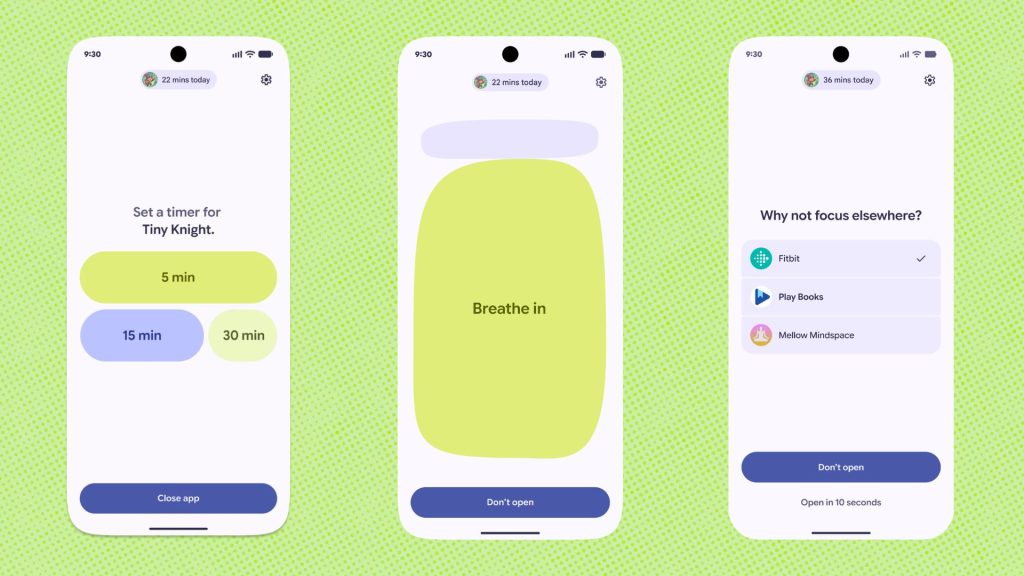
Essentially, when you open a distracting game or app (we’re looking at you, Instagram and TikTok), Pause Point will appear and give you a “10-second breather”. During this 10-second period you’re encouraged to either do a short breathing exercise or set a timer to limit your time scrolling. The idea here is to help you either reconsider whether you really need to start a scrolling or gaming session and, if you conclude that you do, then you should try and limit the amount of time you spend doing so.
Pause Point encourages you to take a 10 second breather before opening a distracting app
In addition, Pause Point can also offer you alternative apps to visit instead, like Play Books for accessing ebooks or Mindspace. It can also show you some of your favourite pictures too.
Finally, if you decide to disable the feature entirely, then Pause Point will require your phone to restart. That’s just the right level of annoyance to make you decide either against disabling Pause Point or to stop yourself from accessing a time-wasting app.
How is Pause Point different from time limit notifications?
Although it does have a built-in timer, Pause Point gives you a 10-second breather to decide whether you really want to access the app. This will undoubtedly be useful, as many of us are guilty of picking up our phones and opening an app purely out of habit and without much thought behind doing so.
Plus, the fact Pause Point can provide alternative apps for you to access is especially useful as it means you can put your phone to better use. If you’ve ever seen your screen time and thought “what a waste”, using that time on a more productive app might make you feel that bit better.
Finally, while standard app-limits can easily be turned off without needing a second thought, Pause Point will require users to restart their phone to disable the tool.
When will Pause Point launch?
Pause Point will launch with Android 17 later this year. At the time of writing, other than Although Google hasn’t announced exactly when Android 17 will roll out, it has said that it will come to Pixel devices from “this summer”.
The post Android 17’s Pause Point will help you break your doomscrolling habits appeared first on Trusted Reviews.