

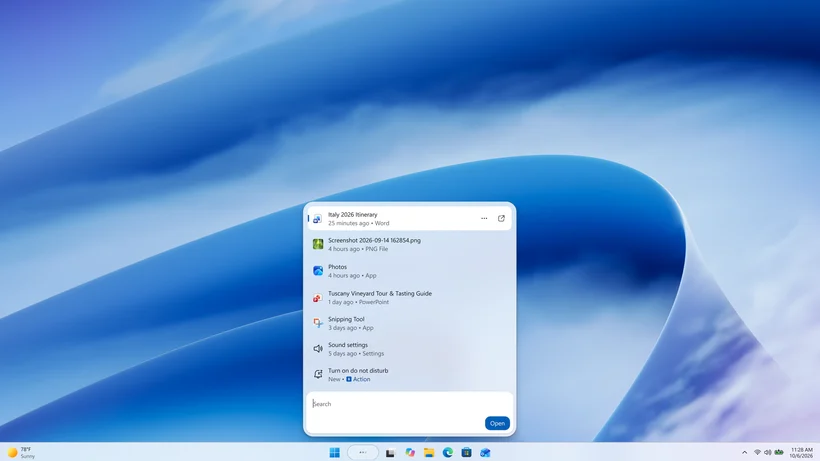
Microsoft has released Windows 11 Insider Beta Build 26320.9876 with a rebuilt Windows Search interface.
The new Search experience runs on WinUI 3, Microsoft’s current native app framework, and the release notes promise faster performance alongside a streamlined layout that makes results easier to scan at a glance.
More significantly, Search now handles quick system tasks inline. Users can turn on Bluetooth or dark mode, adjust screen brightness, mute their device, or arrange open windows straight from the results panel.
That shortcut approach brings Windows closer to Apple’s Spotlight on macOS and Microsoft’s own PowerToys Command Palette, both of which treat the search bar as a place to run actions rather than just find files.
Beyond the new actions, Search is also getting better at interpreting typos and synonyms, although English remains the only supported language for this first release and Microsoft plans further tuning over the coming weeks.
Windows Hello, captions and gaming changes
Outside Search, Windows Hello facial recognition can now temporarily brighten the display to help users sign in from a dark or dimly lit room, which covers a scenario where camera-based logins can struggle.
The option sits behind a toggle under Accounts and Sign-in options in Settings. Users need to switch it on manually, as the brightness adjustment stays inactive by default in this Beta build.
Alongside the sign-in change, Live captions gain more control over transcription, with users now able to caption system audio, their microphone, or both, which suits in-person conversations as well as meetings and video playback.
For gamers, Xbox mode now carries the full Quick settings panel in its Gaming Task View navigation bar, so changing volume or connecting to Wi-Fi no longer means leaving the full-screen interface.
Smaller tweaks round out the build with a tilde shortcut to the user profile folder in File Explorer’s address bar, easier-to-dismiss Sticky Keys prompts, and web sign-in support for Microsoft Entra hybrid joined devices.
Separately, the Beta channel moves to Windows 11 version 26H2 with this release, although the change arrives through an enablement package and brings nothing significant on its own, according to Microsoft.
The new Search is rolling out gradually to Beta channel Insiders, and Microsoft has not given a timeline for when, or whether, these features will reach the public release of Windows 11.
The post Windows 11 gets redesigned Search with quick actions and improved facial recognition appeared first on Trusted Reviews.